1. Support Center
  2. Horizon Mobile
  3. Report Writing and Features
  • Accounts and Billing
    • Username and Password
    • Subscription & Payment Options
    • Referral Program
    • Manage Employee Accounts
    • Email Settings
  • Horizon Mobile
    • Settings and Permissions
    • Troubleshooting Tips
    • Report Writing and Features
  • Company Settings
    • Company Information
    • Contracts
    • Inspection Services and Fees
    • Report Appearance and Branding
  • Schedule Inspections
    • Payment Processing
    • Customizing the Work Order
    • Real Estate Agents & Offices
    • General Tips and Frequently Asked Questions
  • Write and Publish Reports
    • The Basics
    • Templates
    • Report Writing: Recommendations
    • Report Writing: Description
    • Report Writing: Limitations
    • Report Flex
    • Ancillaries
    • TREC
    • Report Writing F.A.Q.
    • Report Publishing F.A.Q.
  • Write Reports using Horizon Mobile
  • Horizon Marketer
  • Action List
  • Report Designer
  • Apps and Integrations
    • Guardian Financial
    • Authorize.net
    • RecallChek
    • Google Calendar
    • Listen360
    • HomeBinder
    • NXT Inspekt
    • Inspection Support Network (ISN)
  • Business Tools & Data Export
    • Business Tools
    • Data Export
  • Training & Support
    • Past Recordings
  • Youtube & FAQ's
  • Announcements & Latest News
    • Past Announcements - 2018 and Older
  • Frequently Asked Questions
  • Resources
    • Extra
  • Work Order
    • Invoice

How to Switch to Dark Mode on Horizon Mobile 3

Please follow these steps to switch to dark mode on Horizon Mobile 3

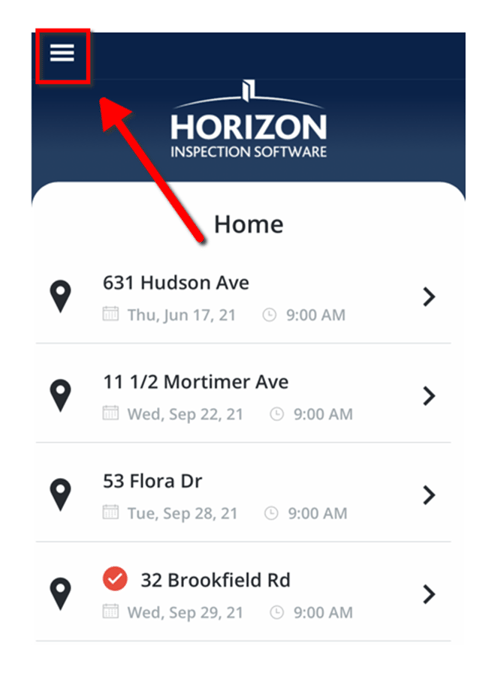
1. Tap the Hamburger menu at the top left of the home screen.
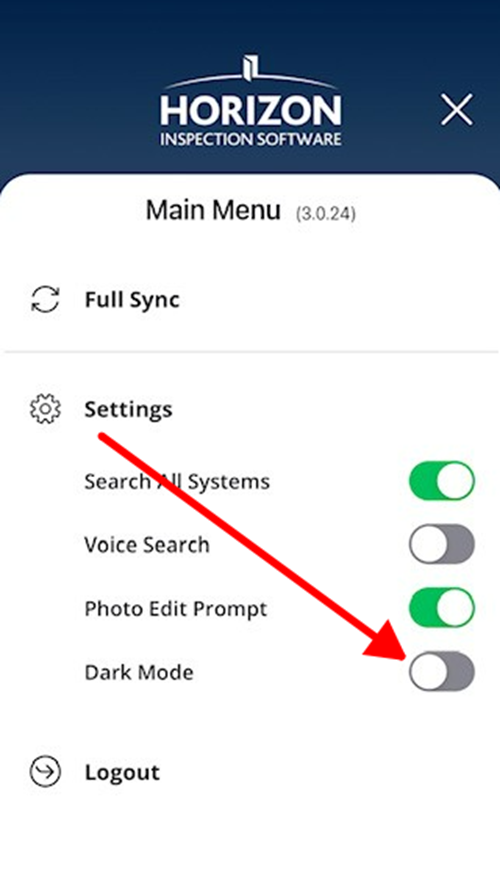
2. Tap the Dark Mode button to put Horizon Mobile into Dark mode.
 

3. Now the screen will display in dark mode.
Chill listening crop-3

Reach us by Phone: Monday to Friday 8 AM to 7 PM ET | 1-866-303-7999

Copyright © 2025, Carson Dunlop